Safari extension · iOS · Mac
Curb hides the feed.
You stay in control.
Block algorithmic feeds on YouTube, Instagram, Facebook, Reddit, X and LinkedIn in Safari. $2.99 once. No subscription. No account.
- ✓Feed gone. Search still works.
- ✓Hide Shorts, Reels & Explore too.
- ✓Works on iOS and macOS.
- ✓Private. Zero data collected.
Shorts & Reels
Block the scroll traps too.
Hide Shorts, Reels, and Explore — enable per site in the Curb popup. Search, messages, and groups stay on.
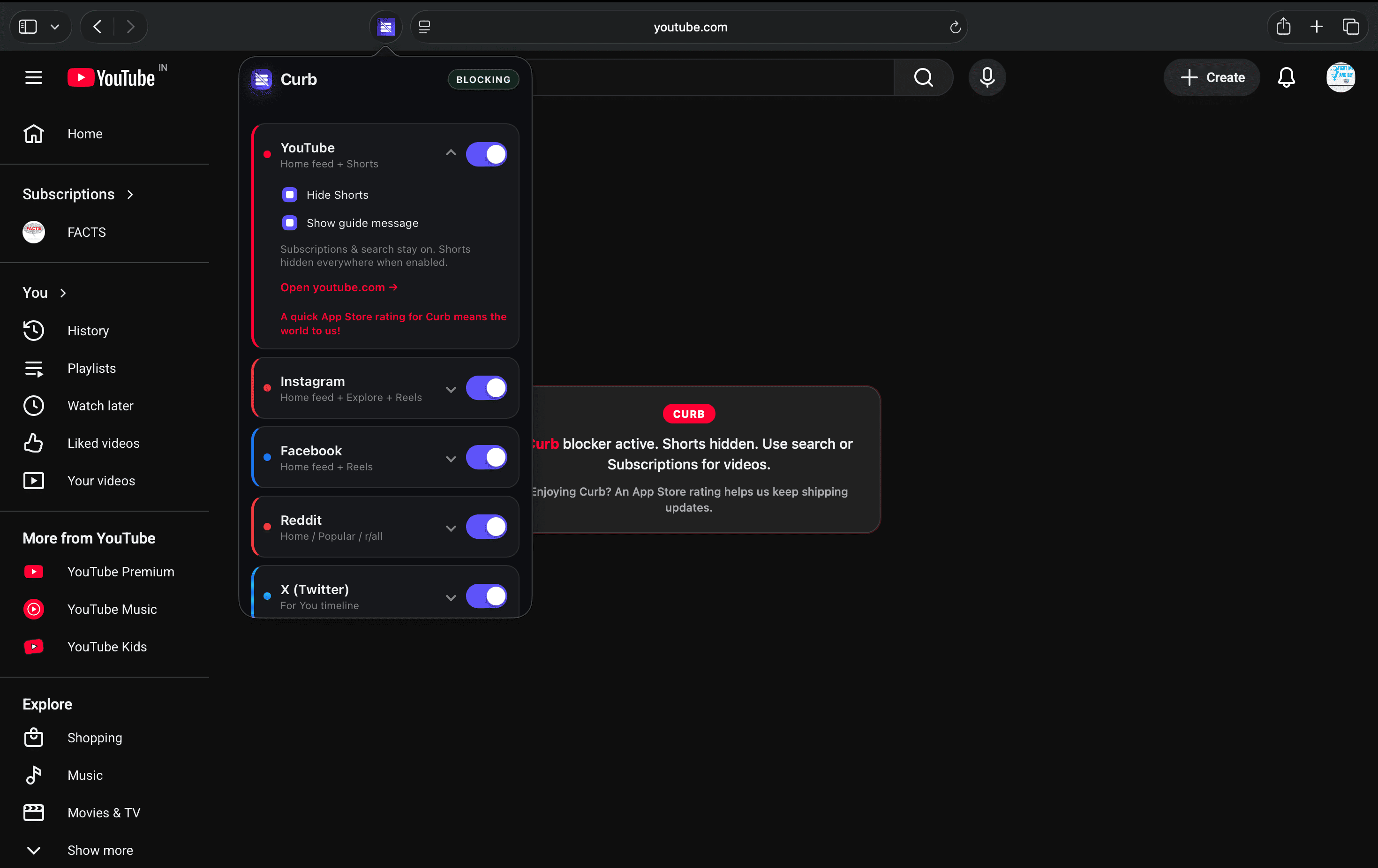
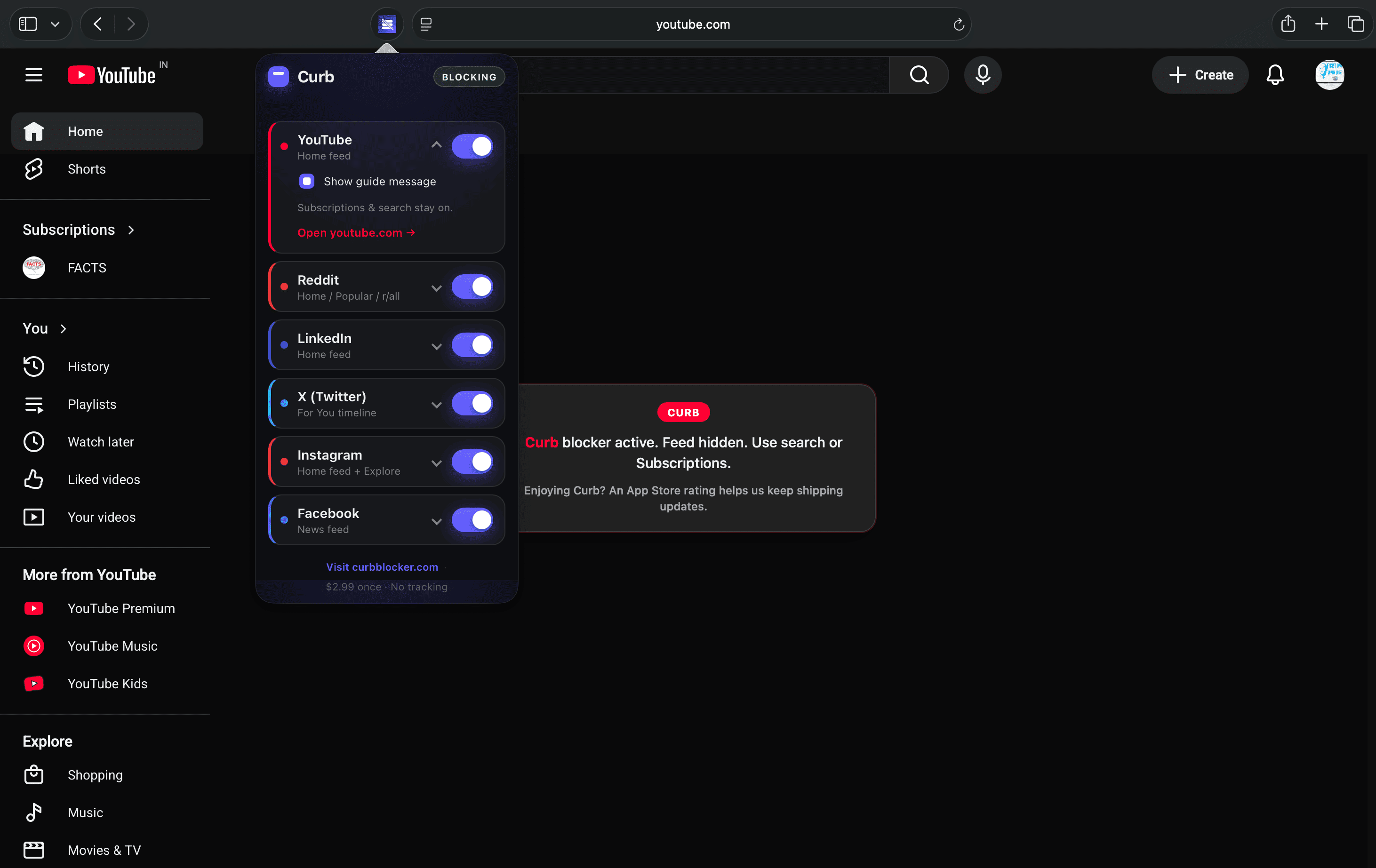
Real screenshot from Safari on Mac. Shorts hidden — search and subscriptions still work.
What it blocks
Six sites.
One extension.
Most blockers pick one platform. Curb covers the places people actually lose an hour without noticing. Tap a site to see exactly what gets blocked.
Home feed · Shorts
What Curb blocks
- ✓Home feed recommendations
- ✓Shorts shelf on home and /shorts pages — enable Hide Shorts in the Curb popup
What stays on
- →Search and individual videos you open
- →Subscriptions and Watch Later
- →Channels and playlists you visit directly
Home feed · Reels · Explore
What Curb blocks
- ✓Home feed
- ✓Reels tab and /reels pages — enable Hide Reels in the Curb popup
- ✓Explore grid — enable Hide Explore in the Curb popup
What stays on
- →Direct messages and stories tray (default)
- →Profile and posts you open directly
- →Search when you need it
News feed · Reels
What Curb blocks
- ✓News feed on home
- ✓Reels tab and reel/watch pages — enable Hide Reels in the Curb popup
What stays on
- →Messenger, Groups, and Events
- →Marketplace, search, and pages you open directly
- →Notifications and bookmarks
Home · Popular · r/all
What Curb blocks
- ✓Home feed
- ✓Popular and r/all infinite scroll
What stays on
- →Subreddits you open directly
- →Search, saved posts, and messages
- →Individual posts and comment threads
For You timeline
What Curb blocks
- ✓For You timeline and home feed
What stays on
- →Following tab (when you choose to use it)
- →Search, lists, and bookmarks
- →Profiles and posts you open directly
Home feed
What Curb blocks
- ✓Home feed and For You-style recommendations
What stays on
- →Profile, messages, and notifications
- →Search and job listings
- →Posts you open from a direct link
Safari only, not the apps. Apple doesn't let extensions change the native YouTube, Instagram, Facebook, Reddit, X, or LinkedIn apps. Curb works on those websites inside Safari. If a link opens an app, open Safari and go to the site there.
One-minute setup
Three steps. Then it just works.
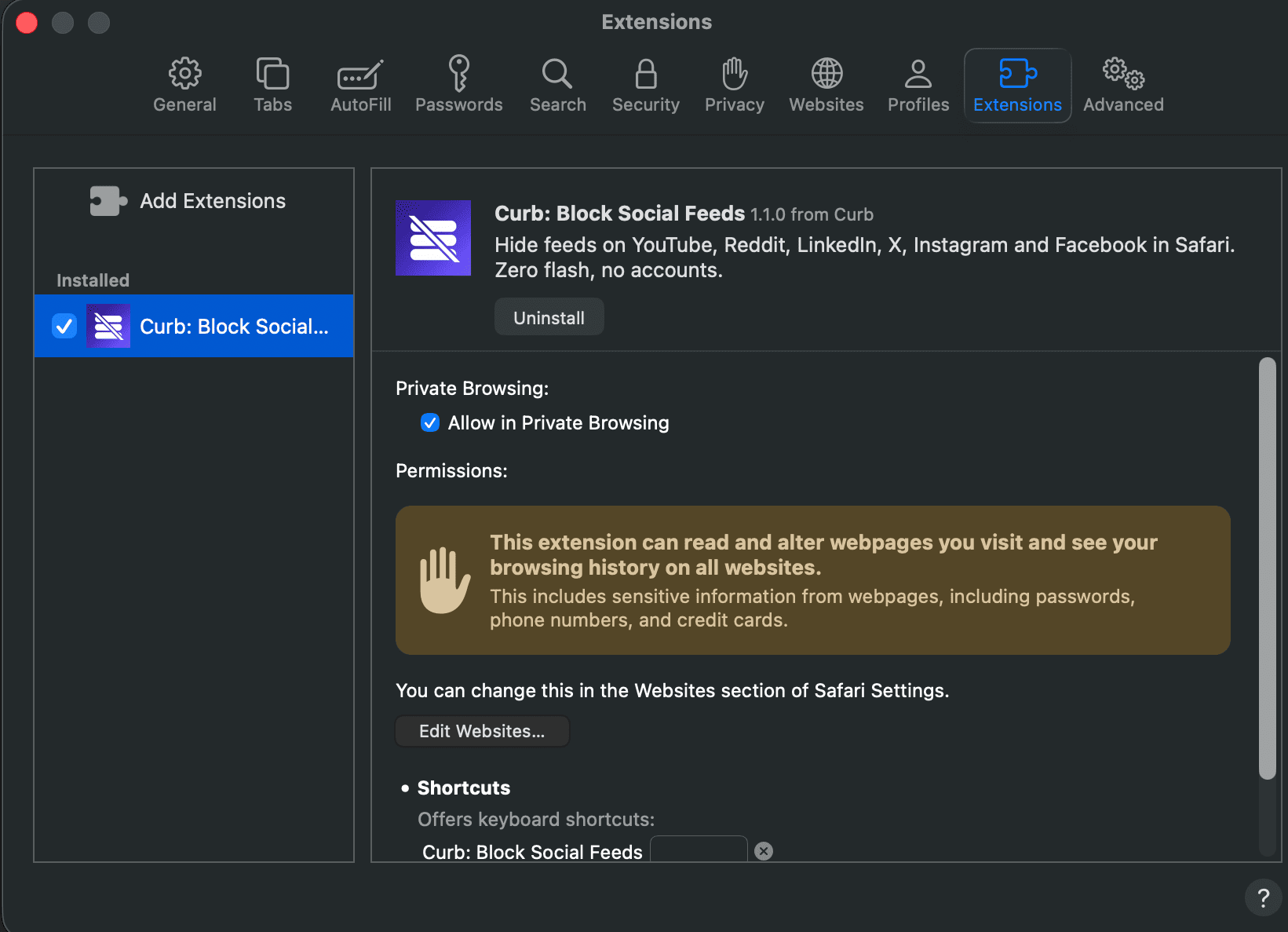
Enable Curb in Safari
Open Safari's extension settings and switch Curb on. Tick “Allow in Private Browsing” while you're there.
About Safari's warning — Safari may show a yellow warning about “reading and altering webpages.” That is Apple's standard language for any extension that hides page content — including Curb. Curb uses it only to remove feeds on sites you allow. Curb has no access to your accounts, passwords, or personal data — nothing leaves your device. No servers, no analytics. App Store label: Data Not Collected.
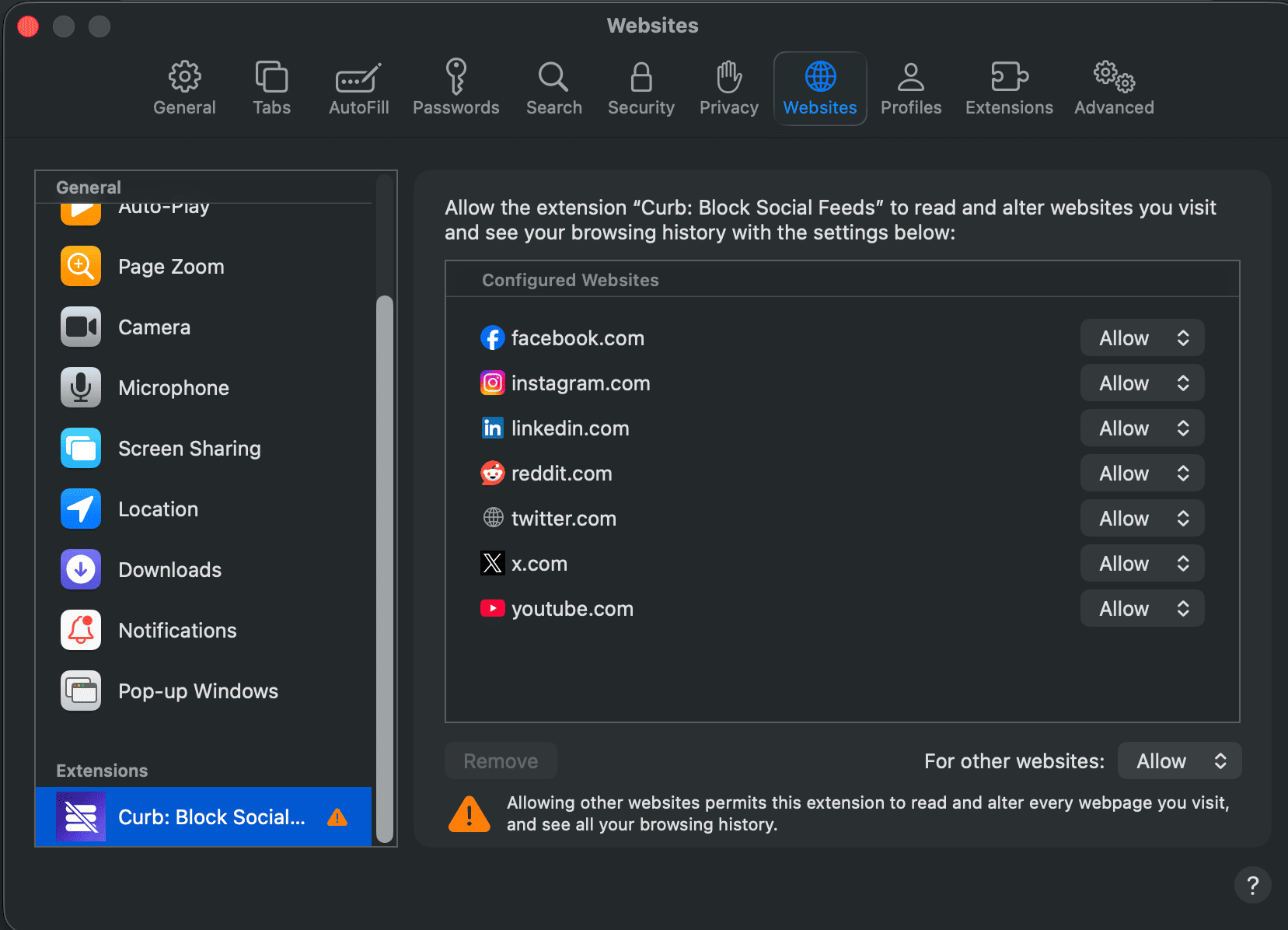
Set websites to Allow
This is the step people miss. Change permission from “Ask” to “Allow” for each site — or Allow on All Websites.
About Safari's warning — On the Websites screen, Safari may say the extension can “see your browsing history.” That is generic Apple wording for any extension with site access — not a capability Curb has or uses. Curb cannot see your accounts, browsing history, or personal data. Feed blocking runs entirely on your device; nothing is collected or transmitted.
Visit a site. Check it.
Open youtube.com, reddit.com, linkedin.com, x.com, instagram.com or facebook.com in Safari. The feed should be gone and a centered Curb guide appears. Works signed in or out.
Privacy
We can't see what you browse. Literally.
The Curb app collects nothing — App Store label: Data Not Collected. This marketing site uses anonymous usage analytics (Vercel, Google Analytics, Microsoft Clarity). It never runs in Safari and never sees what you browse.
Read the privacy policy →FAQ
Common questions
- Does it work in the YouTube, Instagram, or other native apps?
- No — and no extension can. Curb only works on websites inside Safari — YouTube, Instagram, Facebook, Reddit, X, and LinkedIn. If a link opens an app, open the site in Safari instead.
- Do I need to be signed in to YouTube, Instagram, or other sites for Curb to work?
- No. Curb has no accounts, no ads, and collects no data. You don't need to sign in anywhere for Curb itself — and blocking works whether you're signed into YouTube, Instagram, Reddit, or browsing those sites signed out.
- Does Curb hide YouTube Shorts?
- Yes. Turn on Hide Shorts in the Curb popup for YouTube. Search, Subscriptions, and videos you open directly all keep working.
- Does Curb hide Instagram Reels or Explore?
- Yes. Hide Reels and Hide Explore are separate toggles in the Curb popup — enable either or both. Direct messages, your profile, and search stay on.
- Does Curb hide Facebook Reels?
- Yes. Enable Hide Reels in the Curb popup. Messenger, Groups, Events, and the rest of Facebook stay on.
- Does it block search or subscriptions?
- No. Only the endless home feed goes quiet — and Shorts, Reels, or Explore if you turn those toggles on. Search, messages, subscriptions, and pages you open directly all keep working.
- Why does Safari warn that Curb can read my browsing history?
- Apple shows the same boilerplate for every Safari extension that can modify webpages. Curb needs that permission to hide feed elements on the sites you enable. Curb has no access to your browsing history, accounts, or personal data — nothing is collected and nothing leaves your device. App Store privacy label: Data Not Collected.
- What data does Curb collect?
- None in the app. No accounts, no servers, no app analytics. Everything stays on your device. This website uses anonymous usage analytics (Vercel, Google Analytics, Microsoft Clarity) — never your Safari browsing.
- Which devices are supported?
- iPhone, iPad, and Mac — anywhere Safari runs on iOS or macOS.
- What if a site updates and blocking stops?
- Platforms change their layouts sometimes. Curb shows a notice in the Safari popup when a site may need an update. Email support@curbblocker.com — tell us the site and your device. We ship fixes through the App Store. You paid once; we keep it working.
- Still stuck after setup?
- Email support@curbblocker.com and we'll help you get it working.
Keep the site.
Lose the feed.
$2.99 once · No subscription · iOS & Mac